
Assistive Technology Accommodation: A Parent's Guide
An assistive technology accommodation is a formal modification or specialized device provided to a student with a disability to remove barriers to learning, testing, or daily academic tasks. Under federal regulations, assistive technology covers any product or system that improves functional capabilities, ranging from a simple pencil grip to a sophisticated eye-gaze communication device. For parents navigating IEP meetings, 504 plans, or standardized test requests with organizations like the College Board or ACT, understanding what these accommodations include and how they are legally protected is the foundation of effective advocacy.
What is an assistive technology accommodation in education?
An assistive technology accommodation is both a device and a support service, and federal law treats them as inseparable. The Individuals with Disabilities Education Act (IDEA) defines assistive technology as any item, piece of equipment, or product system used to increase, maintain, or improve the functional capabilities of a student with a disability. This definition is deliberately broad, covering tools that cost nothing (such as built-in accessibility features in Windows or macOS) and tools that cost over $8,000, such as augmentative and alternative communication (AAC) devices like the Tobii Dynavox.
The term “accommodation” in this context refers to the formal arrangement that grants a student access to the technology during instruction or testing. Without the accommodation on record in an IEP or 504 plan, a student may own a device but be denied permission to use it on a standardized exam. That distinction matters enormously when your child sits for the SAT, ACT, MCAT, or LSAT.

IEP teams are required to consider AT needs annually, which means the conversation does not end after one meeting. As a student’s grade level, coursework, and testing demands change, the technology and accommodations supporting them should be reassessed and updated accordingly.
Types of assistive technology: low-tech to high-tech
Assistive technology spans a wide spectrum, and parents often discover that the most effective solution for their child is not the most expensive one. The field is typically organized into low-tech, mid-tech, and high-tech categories, each serving different functional needs.
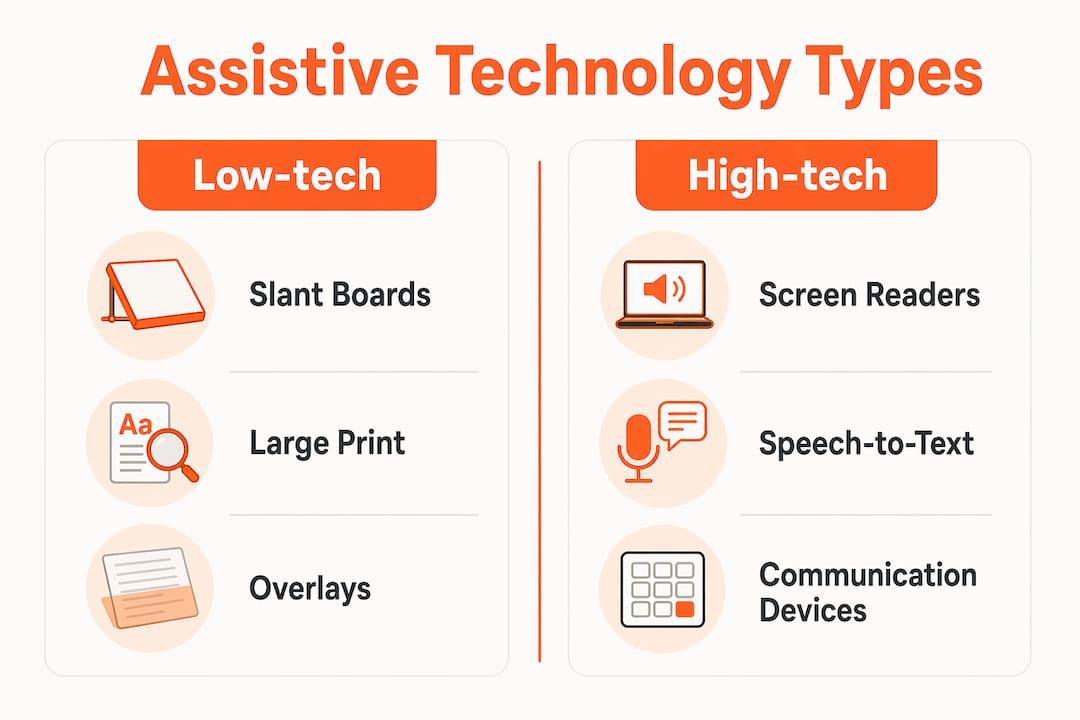
Low-tech AT includes tools with no electronic components: highlighted overlays, slant boards, large-print textbooks, graphic organizers, and adapted pencils. These are inexpensive, rarely require training, and are often the first line of support for students with mild learning differences.
Mid-tech AT includes battery-operated or simple electronic devices: talking calculators, digital timers, audio recorders, and basic text-to-speech software like NaturalReader. These tools support students with attention, memory, or processing challenges without requiring complex setup.
High-tech AT includes sophisticated software and hardware systems. Examples include:
- Screen readers such as JAWS (Job Access With Speech) and NVDA for students with visual impairments
- Speech-to-text software such as Dragon NaturallySpeaking for students with motor or writing disabilities
- AAC devices such as the Tobii Dynavox for students with complex communication needs
- Eye-gaze systems for students with severe physical disabilities who cannot use a keyboard or mouse
- Braille displays and embossers for students who read Braille
In standardized testing contexts, accommodations examples include Braille or large-print booklets, screen reading technology, scribes, extended time, distraction-free rooms, and medication allowances. Each of these maps directly to a functional limitation documented in the student’s disability evaluation.
| AT Category | Example Devices | Primary Function |
|---|---|---|
| Low-tech | Slant boards, large-print books, overlays | Physical access and readability |
| Mid-tech | Talking calculators, audio recorders | Memory and processing support |
| High-tech (communication) | Tobii Dynavox, AAC apps | Expressive communication |
| High-tech (sensory) | JAWS, Braille displays | Visual access to text |
| High-tech (motor) | Dragon NaturallySpeaking, eye-gaze systems | Writing and navigation |
How legal frameworks require schools and test makers to provide AT
The legal obligation to provide assistive technology accommodations rests on two federal statutes: IDEA and the Americans with Disabilities Act (ADA). Understanding both helps parents know exactly what to demand and from whom.
Under IDEA, school districts must provide AT at no cost to families when it is documented in the IEP as necessary for a Free Appropriate Public Education (FAPE). This obligation extends to expensive devices. If an AAC system costing over $8,000 is what a student needs to access the curriculum, the district pays for it. The law does not cap costs.
The ADA applies a different but complementary standard to testing organizations. Under the ADA, testing must reflect aptitude, not impairment. Testing entities such as the College Board, ACT, NBME, and LSAC are required to provide auxiliary aids and modifications that give students with disabilities a fair opportunity to demonstrate their actual knowledge and skills. Extended time, screen readers, and distraction-free rooms are all recognized auxiliary aids under this standard.
The practical challenge is that the interactive process between families and institutions often stalls because neither side fully understands what constitutes an effective reasonable accommodation. Schools sometimes offer outdated technology. Testing organizations sometimes deny requests without adequate explanation. This is why documentation, persistence, and knowing your legal rights are non-negotiable.
Key legal protections parents should know:
- IDEA: IEP teams must consider AT needs at every annual review, not just at initial eligibility.
- ADA Title II and III: Apply to public schools and private testing organizations, respectively.
- Section 504: Covers students who do not qualify for special education but still have documented disabilities requiring accommodations.
- FAPE obligation: Districts cannot deny AT based on cost alone.
Pro Tip: Request that the IEP explicitly name the specific device and software version your child uses, not just a generic category like “text-to-speech.” Vague language gives schools and testing organizations room to substitute inferior tools.
How parents can advocate for the right AT accommodations
Securing the right assistive technology accommodation requires a structured approach, not just a request at an IEP meeting. The following steps give parents a clear path forward.
Request a formal AT evaluation. Ask the IEP or 504 team in writing to conduct an assistive technology assessment. Schools are required to respond to written requests within a reasonable timeframe. An AT specialist, not just a classroom teacher, should conduct this evaluation.
Use the SETT framework as your guide. The SETT framework organizes AT decisions around four factors: Student (what are the functional needs?), Environment (where will the student use the technology?), Tasks (what specific activities require support?), and Tools (what devices or software address those needs?). This framework prevents the common mistake of chasing the newest device rather than the most appropriate one.
Gather documentation from specialists. A psychoeducational evaluation, neuropsychological report, or speech-language assessment provides the clinical evidence that supports an AT recommendation. Testing organizations like the College Board require this documentation when reviewing accommodation requests.
Put everything in writing. Verbal agreements at IEP meetings carry no legal weight. Every accommodation, device, and service must appear in the written IEP or 504 plan. Follow up every meeting with a written summary of what was agreed upon.
Prepare for standardized test requests separately. School accommodations do not automatically transfer to the SAT, ACT, or other exams. Each testing organization has its own application process. For guidance on securing test accommodations, parents should start that process at least six months before the intended test date.
Pro Tip: If a school denies an AT request, ask for the denial in writing and request a prior written notice (PWN) explaining the decision. This document is your starting point for a formal dispute.
What the research says about assistive technology benefits
The evidence supporting assistive technology accommodations in education is substantial. A meta-analysis on text-to-speech technology found an effect size of 0.61 for students with severe reading impairments. An effect size above 0.40 is generally considered educationally significant, meaning text-to-speech produces measurable, meaningful gains in reading comprehension and academic performance.
Beyond test scores, AT changes how students experience school. Students who use AT report higher self-confidence, greater willingness to attempt challenging tasks, and reduced frustration during assessments. These outcomes matter because academic confidence compounds over time.
“Assistive technology is not about fixing a disability. It is about removing environmental barriers so that a person can function more independently.”
This framing is important for parents to internalize. When you advocate for a screen reader or extended time, you are not asking for an unfair advantage. You are asking for the removal of a barrier that other students do not face. That is the legal and ethical foundation of every AT accommodation.
The demand for AT is growing as awareness of disability rights expands and as more schools adopt universal design principles. The range of available tools has grown accordingly, from specialized apps on standard iPads to AI-powered speech recognition systems that adapt to individual speech patterns.
For a detailed look at how these tools apply in testing contexts, Testaccommodations has published best practices for testing students with disabilities that covers both school-based and standardized exam settings.
Key takeaways
Assistive technology accommodations are legally protected, evidence-based supports that schools and testing organizations must provide to students with documented disabilities at no cost to families.
| Point | Details |
|---|---|
| Federal definition is broad | AT covers everything from free built-in software to AAC devices costing over $8,000. |
| IEP teams must act annually | IDEA requires AT needs to be considered at every annual IEP review, not just at initial eligibility. |
| ADA covers standardized tests | Testing organizations must provide auxiliary aids so exams reflect aptitude, not disability. |
| SETT framework guides decisions | Choosing AT based on student, environment, tasks, and tools produces better outcomes than chasing the latest device. |
| Documentation drives approval | Specific, written documentation from qualified specialists is required for both school and testing organization requests. |
What I’ve learned after years of watching families fight for AT accommodations
I have seen parents walk into IEP meetings armed with printouts of the latest high-tech devices, convinced that the most advanced tool is the right one. In most cases, the student ends up with something that looks impressive but does not match how they actually learn or test. The SETT framework exists precisely because this mistake is so common. Suitability beats sophistication every time.
The other pattern I see repeatedly is parents who accept vague IEP language because they do not want to seem difficult. “Text-to-speech support” written into a plan without specifying the software, the device, and the testing context is nearly useless when a testing organization reviews the request. Specificity is not being demanding. It is being effective.
What actually works is a combination of strong documentation, precise IEP language, and early action on standardized test requests. Families who start the accommodation process six to twelve months before a major exam almost always have better outcomes than those who begin thirty days out. The testing organizations have their own timelines, their own documentation requirements, and their own appeals processes. Knowing those systems in advance is not optional if you want results.
My honest advice: treat the AT accommodation process as a legal and administrative project, not just an educational conversation. The families who succeed are the ones who document everything, follow up in writing, and do not accept a denial as a final answer.
— Roger
Get the support your child deserves on standardized tests
Securing an assistive technology accommodation for school is one challenge. Getting that same accommodation approved for the SAT, ACT, MCAT, or LSAT is an entirely different process, and denials are more common than most families expect.
Testaccommodations specializes in helping families whose accommodation requests have been denied by testing organizations. The team reviews your documentation, identifies gaps, and guides you through the appeals process with the specificity that testing organizations require. If your child has an established IEP or 504 plan and is still facing a denial, you do not have to accept that outcome. Visit Testaccommodations to understand your options and take the next step with confidence.
FAQ
What does assistive technology accommodation mean?
An assistive technology accommodation is a formal arrangement that grants a student with a disability access to specialized devices or software during instruction or testing. It is documented in an IEP or 504 plan and is legally required under IDEA and the ADA.
Does a school IEP accommodation automatically apply to the SAT or ACT?
No. School-based IEP accommodations do not transfer automatically to standardized tests. The College Board, ACT, and other testing organizations require separate applications with supporting documentation, and they make independent approval decisions.
Who pays for assistive technology in school?
Under IDEA, school districts must fund all AT devices and services documented in a student’s IEP at no cost to the family, including high-cost equipment like AAC devices.
What are common assistive technology examples for testing?
Common AT accommodations on standardized tests include screen readers, extended time, Braille or large-print materials, scribes, speech-to-text software, and distraction-free testing rooms, as outlined in ADA testing guidelines.
What should I do if an AT accommodation request is denied?
Request the denial in writing, ask for a prior written notice explaining the decision, and review the documentation your evaluator provided. Testaccommodations can help families identify documentation gaps and navigate the testing accommodations FAQs process when a denial needs to be challenged.